An emerging technology to enhance student creativity is Quiver Vision. This is an AR (Augmented Reality) software that produces 3D animations from a piece of paper, which the user colours in for enhanced animation (QuiverVision, 2016). From the group discussion in the tutorial, Quiver Vision is easy to learn, straightforward, and is initially engaging for students as it brings images ‘to life’.
(shared image below from tutorial)
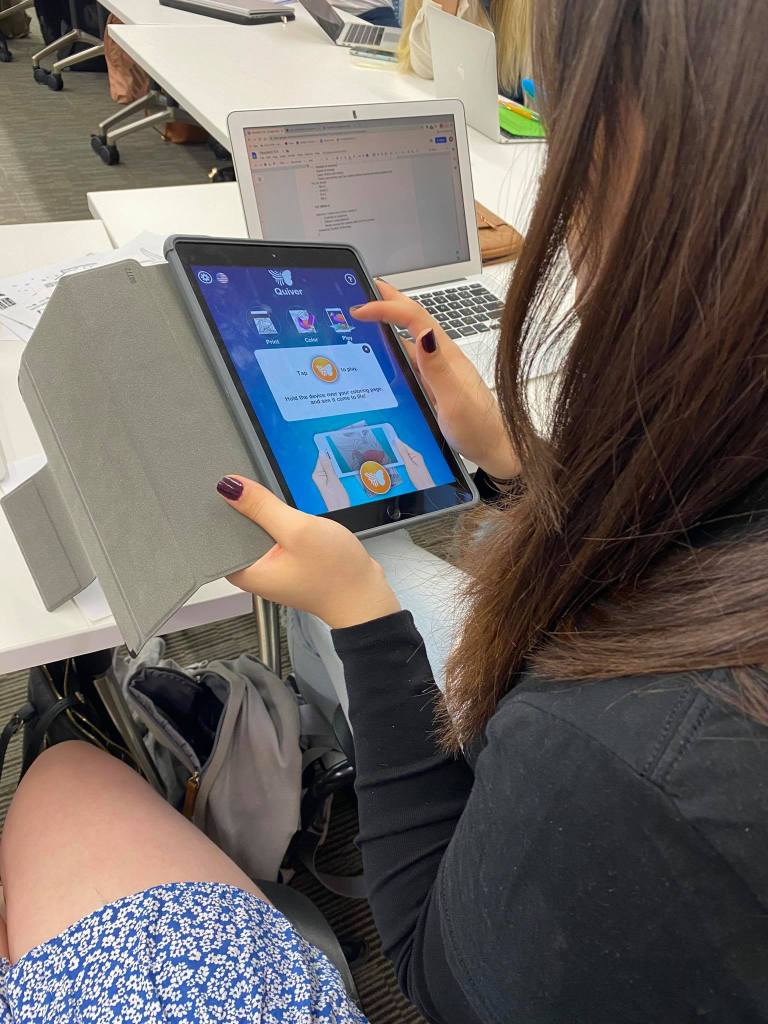

(shared image above from tutorial)
The usability and relevance for Quiver Vision is applicable to various subjects (I would assume most relevant for K-8). The options range from animal/plant cell structures or the properties of a volcano. Science, history and geography are domains where teachers could integrate this technology into the classroom to enhance student creativity. For example, a year 7 science lesson may focus on the characteristics of animal/plant cells, the ability to compare the cells (what is consistent/different) and then students testing their knowledge in the Quiver Vision quiz (assessment of learning).
(shared image below from tutorial)

Mathematics or English domains would not work as effectively, since users are strictly limited to the ‘creative’ resources provided by Quiver Vision. Bower, Hedberg & Kuswara (2010) suggested some applicable elements in their approach to conceptualising learning design by utilising the Anderson Krathwohl Taxonomy. For example, depending on the technology selected to foster creativity, a teacher should specifically target a knowledge dimension and cognitive process. Quiver Vision is constrained to factual and conceptual knowledge, combined with remembering, understanding and applying. Students are limited to the resource they are provided with (paper), and the in-app limitations on descriptions/concepts (students can’t add notes/observations to the factual comments provided on resources).
The Australian Curriculum, Assessment and Reporting Authority (ACARA) (n.d.) stresses the importance of developing General Capabilities in students, including ICT capability, and critical and creative thinking. Utilising an effective technology addresses both capabilities, as students are encouraged to ‘think outside of the box’ when seeking alternative solutions, solving problems and clarifying key concepts whilst using emerging technology (ACARA, n.d.). I feel perhaps ICT capability is enhanced, but critical/creative thinking is non-existent with Quiver Vision, especially compared to Bloxels or Scratch Jnr.
Loveless, Burton & Turvey (2006) discuss how some teachers may feel inept towards using certain ICT in the classroom, but Quiver Vision would only promote positive self-efficacy as the teacher can take on a connector role during interpretation stage of the 5 Phases of Design Process below (IDEO, 2012). On the same token, there would be minimal difference in my eyes of doing the same tasks without the use of Quiver Vision, as the constraints on content and the limited choices in-app would not translate to enhancing student creativity.
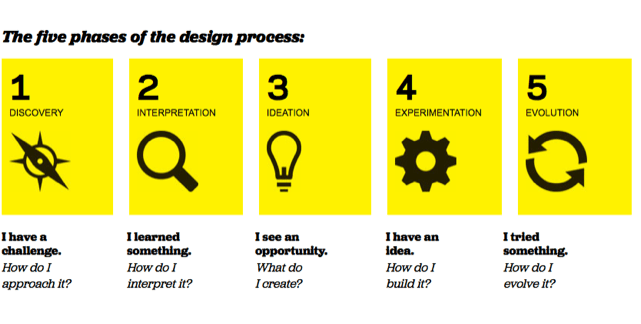
(shared image below from tutorial)
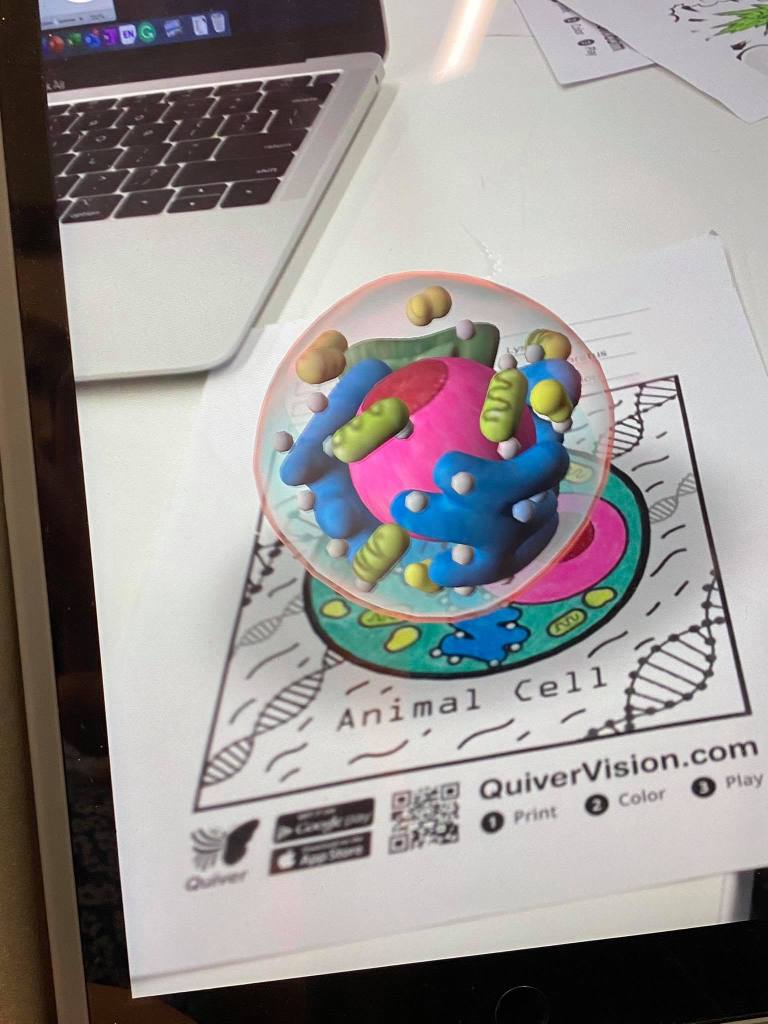
References
Australian Curriculum, Assessment and Reporting Authority [ACARA] (n.d.) Critical and Creative Thinking. Retrieved from: https://www.australiancurriculum.edu.au/f-10-curriculum/general-capabilities/critical-and-creative-thinking/
Bower, M., Hedberg, J. G., & Kuswara, A. (2010). A framework for Web 2.0 learning design. Educational Media International, 47(3), 177-198.
IDEO (2012). Design Thinking for Educators (2nd Edition). Available at: http://designthinkingforeducators.com/
Loveless, A., Burton, J., & Turvey, K. (2006). Developing conceptual frameworks for creativity, ICT and teacher education. Thinking Skills and Creativity, 1(1), 3-13.
QuiverVision. (n.d.). Intro to QuiverVision. Retrieved from http://www.quivervision.com/what-we-do/
 EDUC3620 Digital Creativity and Learning - Peter R's blog
Hey Peter! I appreciate your use of Anderson & Krathwohl’s taxonomy and reference to ACARA to justify your viewpoint on Quiver Vision, however, do you feel as though this would be constant among all augmented reality tools? You also mention that there would, “be minimal difference in my eyes of doing the same tasks without the use of Quiver Vision.” Do you think that Quiver Vision, instead of serving as the medium for demonstrating creativity, would instead enable students to gain an understanding of the given materials from which students could then develop a creative viewpoint? For example, in specific regard to a geography or history lesson with a flag creation task, I feel like having each student be able to represent their new nation and forge alliances with other students to become global superpowers would serve as a potential way for Quiver to promote creativity without being the sole reason for creativity.
LikeLike
Hi Ronin,
I don’t think my stance on Quiver Vision is applicable to all augmented reality tools, where apps such as Sky View or ‘Amazing Space Journey’ are AR apps designed for students, and go into much more detail during a more hands-on experience. With the aforementioned apps, you could use them for the crux of the lesson, as students can dictate their learning path regarding the topic studied (in this case, science and planets). However, I do agree with your point that Quiver Vision would act best as a medium for demonstrating some creativity and promoting creativity in general, especially with the example that you provided!
LikeLike
Hi Peter,
I can tell you have researched thoroughly and put thought into this critique! I particularly like how you have given a valid occurrence in which the program could be used in the classroom. However, your post might benefit from analysing the creative limitations of this example. For instance, are they able to test why their preconceptions of the cell were inaccurate? Can they mould the image in any way besides colour? How could these limitations be improved?
Your comments about teacher self-efficacy towards the technology have added a valued aspect in support of Quiver. Although incorporating a case study from literature could further emphasise this argument!
I can see lecture terminology weaved throughout your argument and a concise format. Perhaps an investigation into augmented reality as a whole could give greater insight into its learning and creative affordances. Is it just Quiver that has these creative limitations or is it embedded in the technology type?
Overall, you have achieved a very thorough critique and used images to aid in our insight into the app! Gold star for you!!
LikeLike
Hi Rebecca,
Thanks for your thorough feedback. I did feel that Quiver Vision is suitable in some circumstances, such as in primary school students. I agree with your comments surrounding the creative limitations posed, such as not being able to mould the image, test preconceptions or take notes – some easier additions to this technology than others.
Loveless, Burton & Turvey (2006) was an effective peer-reviewed journal relating to teacher self-efficacy, based on first-hand experiences of teachers using technology in classrooms!
I am confident that as this course continues, a number of class mates will be divided in opinion surrounding different technologies (including AR) and the possibilities in promoting creativity and learning in the classroom.
LikeLike
Hey, peter!
This was an excellent read, it was interesting to see how the Quiver app can be helpful for some subjects and ineffective for others. It was also great that you provided different ways you could implement it inside the classroom (e.g. the plant/animal cells).
I also chose to analyse Quiver, however, in comparison to yours, my conclusions were drawn to Quiver being supportive of student creativity. It was refreshing to read how effective the app is for student creativity through a different perspective with opposite views.
Linking this to The Australian Curriculum, Assessment and Reporting Authority in order to compare its effectiveness with the learning outcomes was also fascinating to read.
Great work!
LikeLike
Hi Meryam,
Thanks for your feedback. I guess everyone will have a different perspective on how effective different apps and technologies will inspire student creativity or critical thinking, and I think a big factor is subject/level of schooling. For example, my teaching area is Business Studies and Economics, so I feel that senior high school students would not be able to take much away from Quiver Vision, whilst students in primary school would probably think it is amazing and breath-taking.
LikeLike