Tinkercad is an emerging technology which can foster digital creativity and learning in the classroom, specifically in 3D CAD (Computer Aided Design) Design. Tinkercad is a free-to-use online software, where users have the ability to ‘think, create and make’ using the design tools provided, and print their designs (permitting that they have access to a 3D printer) (Autodesk Inc., 2019).
Laurillard (2012) discusses how any technology a teacher decides to use in the classroom must have alignment between the goals, activities and assessment you have determined for your class. A form of inquiry-based learning/design thinking, such as that found in a tech like Tinkercad, possesses the capability to align student and teacher goals. Furthermore, tasks utilising emerging technologies allow for rote/repetitive learning to naturally be reduced as classes become more lively and ever-changing. Pedagogically, this is important for classrooms that I wish to teach upon graduation, as dynamic learning and exposing students to new tasks/technologies as frequently as possible are core goals moving forward.
Marsh, Clarke & Pittaway (2014) stress the importance of alignment in lessons, and the use of backward planning for a structured approach which is effective in developing learning. This means that using a technology like Tinkercad should be the last step in the planning process, not the first. Once goals are clear, Tinkercad is an excellent technology for fostering creativity, when prompted with Apedoe et al. design-based learning cycle.
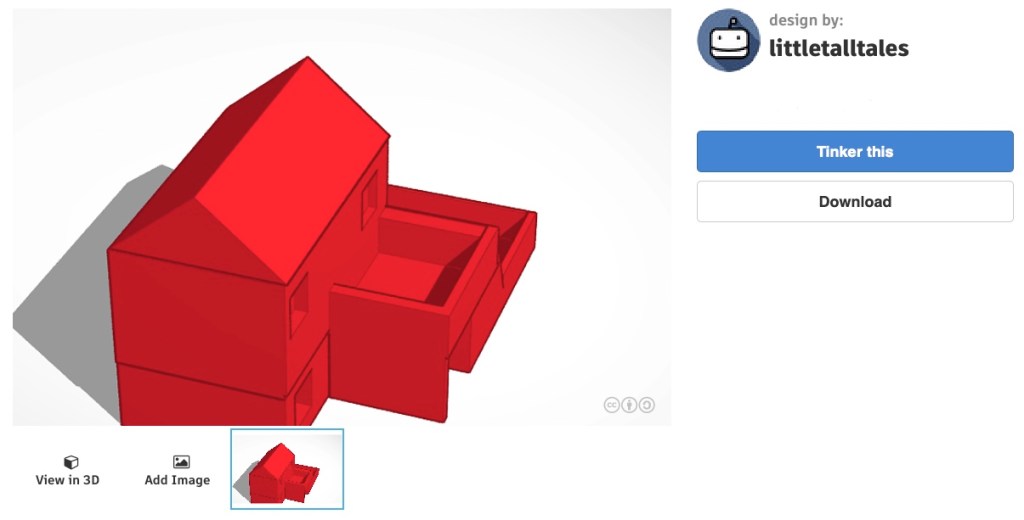
Apedoe et al. (2008) provides a structure for the design-based learning cycle (see below). It is important to note that both in lectures and tutorials for EDUC3620, there is no ‘right’ or ‘correct’ method for design, and some of the steps below may be skipped or rearranged, depending on the task. For example, if using Tinkercad to build a house in D&T (Design and Technology Subject), the testing of ideas may work in tandem with design creation, as students may not know the full capabilities of the software. Then evaluating the outcome and justifying reasons for a certain house design may take place, such as an angled or triangular roof.
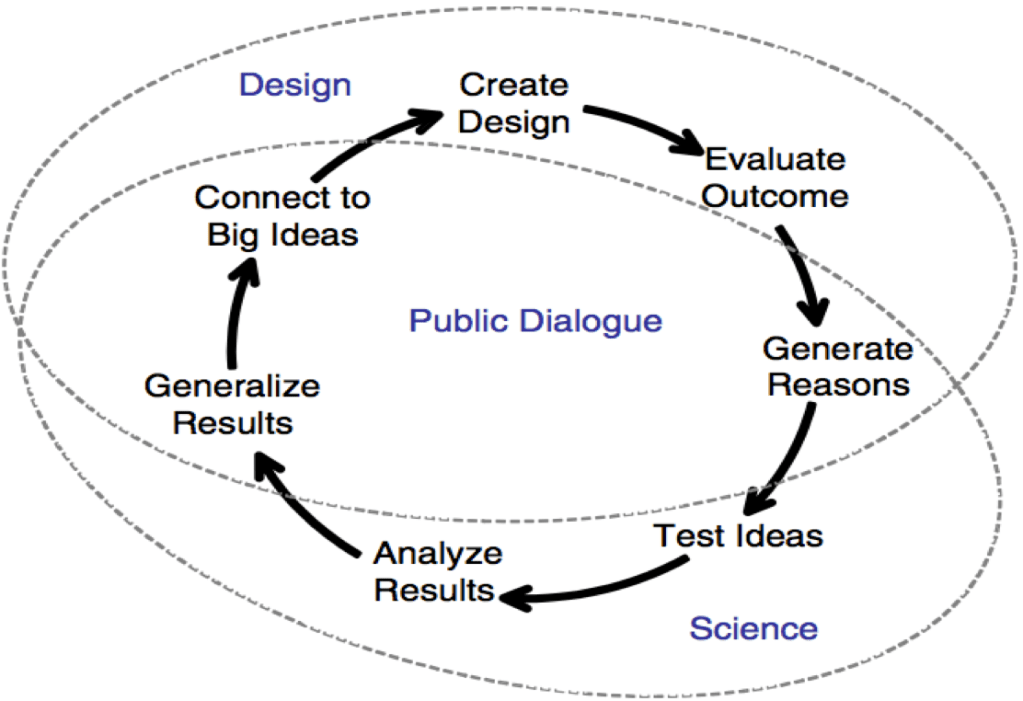
Students can work autonomously in their creation of shapes, and teacher’s can primarily work as a catalyst during phases of the IDEO design process when Tinkercad is utilised (IDEO, 2012). The catalyst role is most fitting since Tinkercad is very intuitive to use, and there are a number of tutorial videos available on YouTube for advanced functionality.
References
Apedoe, X. S., Reynolds, B., Ellefson, M. R. & Schunn, C. D. (2008). Bringing Engineering Design into High School Science Classrooms: The Heating/Cooling Unit. Journal of Science Education and Technology, 17(5), 454-465
Autodesk Inc. (2019). TINKERCAD – My Recent Designs. Retrieved from https://www.tinkercad.com/dashboard
IDEO (2012). Design Thinking for Educators (2nd Edition). Available at: http://designthinkingforeducators.com/
Laurillard, D. (2012). Chapter 5 – What it takes to teach. In Teaching as a Design Science – Building Pedagogical Patterns for Learning and Technology (pp. 64-81). NY: Routledge.
Marsh, C.J., Clarke, M. & Pittaway, S (2014). Marsh’s Becoming a Teacher. Pearson Australia.
 EDUC3620 Digital Creativity and Learning - Peter R's blog
Hi Peter,
My blog is on 3D printing as well and it’s great to read your blog about Tinkercad and its functions. You can see that 3D printing goes through each phases of design process. Do you think we can use 3D printing in all key learning areas? I thought about it and I couldn’t think of ways I could use 3D printing for subjects such as History, Language and many more. Maybe you could suggest classroom activities in future posts.
LikeLike
Hi,
Yes 3D printing when available to students would make a huge difference, as students’ ‘creations’ become reality, which is something very cool! I do not see the necessity to consistently utilise 3D printing for a number of learning areas, however TinkerCad could be used for a number of subjects. Whether students studying history attempted to build the Colosseum, or what a modern day Colosseum would look like; recreate the ‘Trojan horse’ or their own ideas on how to infiltrate a closed off city (Troy); or an English class building a key structure from a required reading, and viewing how each student perceived the structure/person differently (aligning with creativity and critical thinking, using descriptions from a text). Apart from the example of D&T provided in the post, there are also subjects such as history or English where there are examples for where a teacher would utilise Tinkercad in classroom activities.
LikeLike